
Pages, menus and templates
The page manager is where the structure of the site lives — and where a new page takes about a minute.
Open the page manager
From the editor open Pages. Every page in the project is listed with its title and address. From here you can create, rename, duplicate, reorder and delete pages.
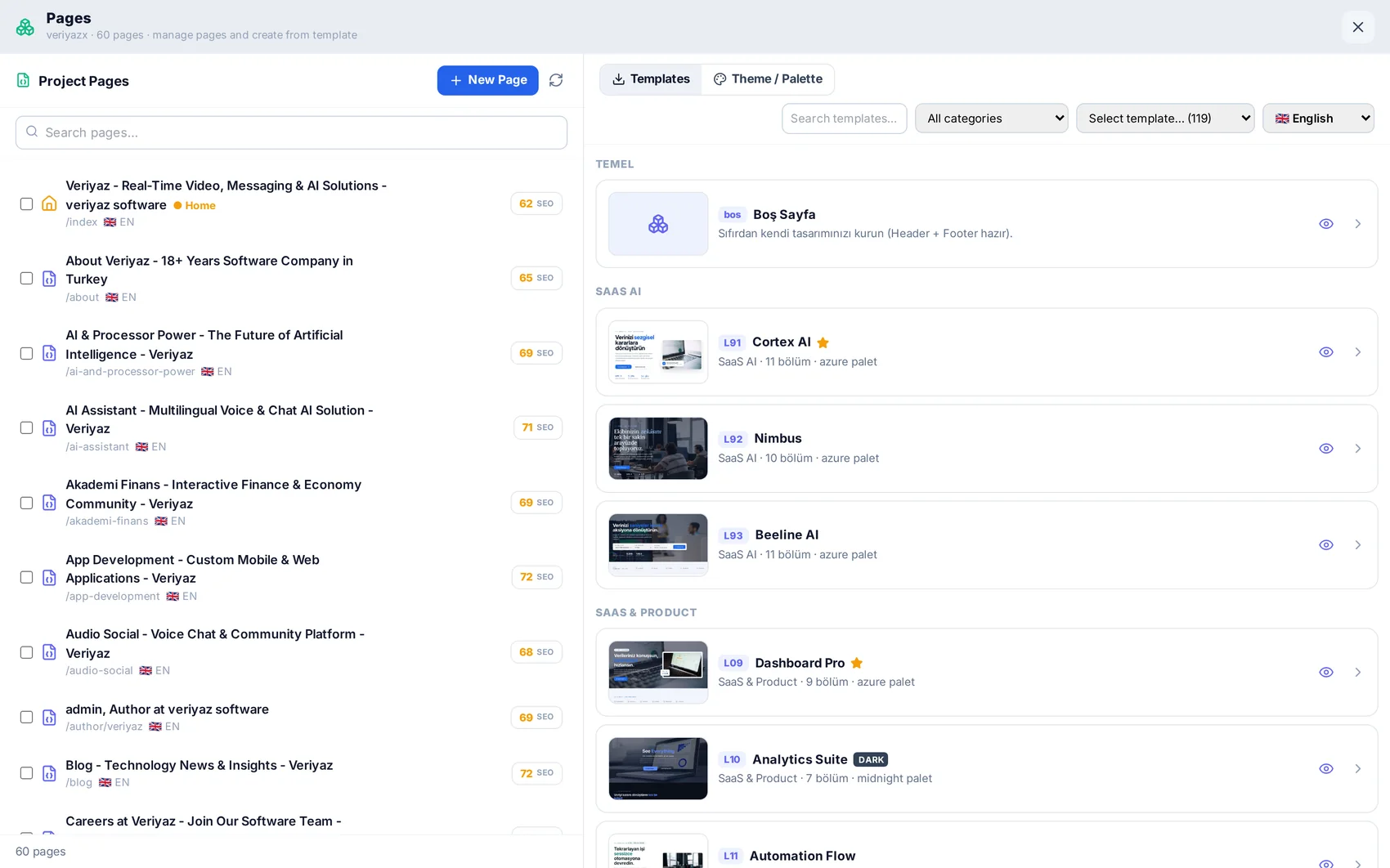
Start a page from a ready layout
New pages can start from one of 50+ layouts — services, pricing, about, contact, blog, portfolio and more. The layout arrives already themed with your palette and fonts, so it does not look like a stock template.
Set the address and SEO fields
Each page has a slug (the part after the domain), a title and a meta description. The SEO module can write these for you page by page, but you can always override them here.
Build the menu
Menus are hierarchical: top-level items, dropdowns and mega menus. Add the new page where it belongs, drag to reorder, and the change applies across every page that uses the global header.
Add another language
Translation converts pages, menus and meta descriptions in place, keeping layout and links intact. Choose the language in Site Settings and the translated pages join the same project.
READ NEXT
The visual editor: blocks, sections and settings
How to edit anything on a page without code — and where the advanced doors are when you want them.
SEO: getting found in Google
Meta and sitemaps, keyword and position tracking, site audits, and your own Search Console data.
Domain, publishing and business email
Go live on your own domain with free SSL, and set up mailboxes on the same name.